Password Security Checklist: 10 Ways to Protect Your Online Accounts
Password Security Checklist: 10 Ways to Protect Your Online Accounts
Billions of account credentials are exposed in data breaches every year. In 2024 alone, multiple major services suffered large-scale leaks, and stolen passwords are routinely traded on the dark web for follow-up attacks. This guide presents 10 actionable steps you can take to strengthen your password security and keep your accounts safe.
1. Use a Unique Password for Every Account
This is the most important rule. Reusing one password across multiple services means a single breach can unlock everything. Attackers routinely perform “credential stuffing” — automatically testing leaked username-password pairs against other sites.
2. Adopt a Password Manager
Remembering dozens of unique passwords is impractical. A password manager lets you memorize one master password while it securely stores the rest.
Recommended options:
- Bitwarden — Open source with a generous free tier
- 1Password — Excellent family and team sharing
- Apple Keychain — Seamless for Apple ecosystem users
3. Enable Two-Factor Authentication (2FA) Everywhere
Even if your password leaks, 2FA can prevent unauthorized access.
Authentication methods ranked by security:
| Method | Security Level | Notes |
|---|---|---|
| Hardware key (YubiKey, etc.) | Highest | Resistant to phishing |
| Authenticator app (Google Authenticator, etc.) | High | TOTP-based |
| SMS verification | Moderate | Vulnerable to SIM swapping |
Prefer authenticator apps or hardware keys over SMS whenever possible.
4. Regularly Check for Credential Leaks
Visit Have I Been Pwned and enter your email address to see if it has appeared in known data breaches. If you find a match, immediately change the password on that service — and on any other service where you used the same password.
5. Recognize Phishing Attacks
Sophisticated phishing emails can be nearly indistinguishable from legitimate service notifications. Follow these principles:
- Never click links in emails — type the URL directly
- Inspect domains carefully (e.g.,
goog1e.comvsgoogle.com) - Be suspicious of messages emphasizing urgency
- No legitimate service will ask for your password via email
6. Be Cautious on Public Wi-Fi
Traffic on public Wi-Fi at cafes, airports, and hotels can potentially be intercepted.
- Never log in on sites that are not using HTTPS
- Use a VPN when possible
- Avoid accessing financial services on public networks
7. Do Not Use Real Answers for Security Questions
Answers to questions like “mother’s maiden name” or “first pet’s name” can often be found on social media. Use random answers for security questions and store them in your password manager.
8. You Do Not Need to Change Passwords on a Schedule
The old advice to rotate passwords every 90 days has been retired. NIST (National Institute of Standards and Technology) no longer recommends periodic changes, as forced rotation tends to produce weaker passwords. Only change a password when you suspect it has been compromised.
9. Browser Password Storage: Proceed with Caution
Modern browser password managers are reasonably secure, but verify the following:
- Your device has a lock screen (PIN, biometrics) enabled
- Never save passwords on shared or public devices
- If using browser sync, ensure the sync account itself is well-protected
10. Use a Random Password Generator
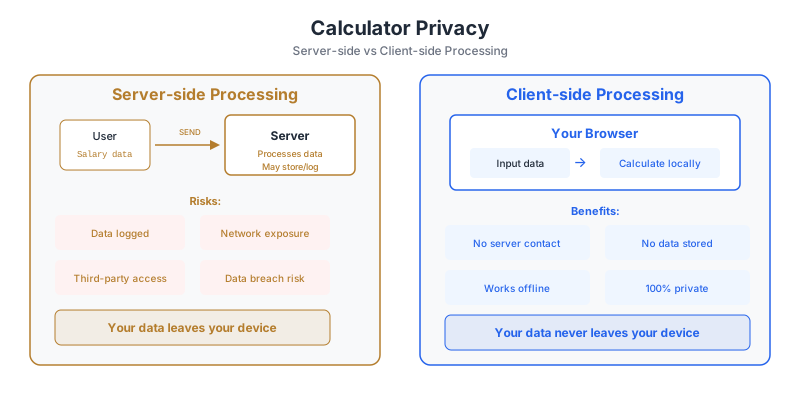
Human-created passwords inevitably contain patterns, no matter how hard you try. Use a generator backed by cryptographically secure randomness. The Password Generator on utilo.kr uses crypto.getRandomValues() in your browser and never sends any data to a server.
Conclusion
Password security is not a one-time setup but an ongoing practice. Adopting a password manager, enabling two-factor authentication, and periodically checking for breaches will defend you against the vast majority of attacks.
Frequently Asked Questions
What standards do utilo calculators use?
Calculations reflect Korea's current laws, tax rates, and insurance premiums as published by official bodies (NTS, NPS, NHIS, BOK, etc.), updated when regulations change.
Is my input stored on the server?
No. All calculations run in your browser; inputs are never sent to or stored on our servers.
Can results differ from reality?
These tools provide general estimates and do not account for individual deductions, exemptions, or special conditions. For authoritative numbers, consult official sources or a professional.